
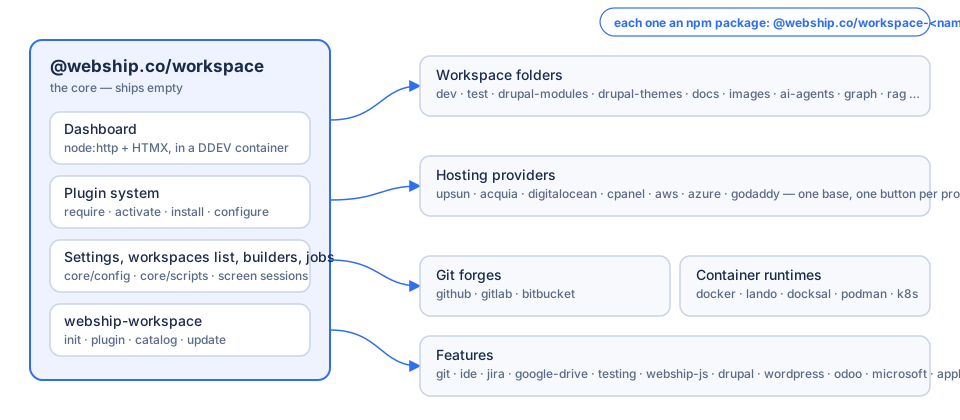
A container-based development workspace with a web dashboard, for Webship projects: Drupal, Drupal CMS, the Webship products, and whatever else your folders hold. The core ships empty. Everything else is a plugin you add when you need it.
Install
# 1. Node.js 20 or newer, Docker, and DDEV (https://ddev.readthedocs.io)
# 2. The workspace, from npm
npm install -g @webship.co/workspace
webship-workspace init ~/workspace       # the core, an empty settings file, the dashboard started
Open https://workspace.ddev.site. It is empty: no workspace folders, no plugins. Add what you need, one package at a time, from Settings → Plugins (the catalogue) or the command line:
webship-workspace plugin require dev     # npm install @webship.co/workspace-dev into the dashboard
webship-workspace plugin activate dev    # on the workspaces list
webship-workspace plugin install dev     # the folder, its settings file, its commands
webship-workspace catalog                # everything you can add
Nothing is added to package.json until you ask for it. The skeleton and the management stay in the core.
What a plugin is
An npm package @webship.co/workspace-<name> (repository github.com/webship/workspace-<name>, branch 1.0.x), written in TypeScript against @webship.co/workspace-plugin-api. Families share a base: hosting providers (upsun, acquia, digitalocean, cpanel, aws, azure, godaddy), git forges (github, gitlab, bitbucket), container runtimes (docker, lando, docksal, podman, kubernetes), and every workspace folder (dev, test, drupal-modules, drupal-themes, docs, images, ai-agents, …) is a plugin too.
Read more
License
GPL-2.0-or-later. Made by Webship.