
@webship.co/workspace-filament 1.0.0 · github.com/webship/workspace-filament · npm
Filament for the Webship Workspace dashboard, on top of its Laravel plugin (@webship.co/workspace-laravel): a builder that makes a real Laravel app with an admin panel in a container — a new app with the panel installed the documented way, or the panel's official demo app with its own seed — the default accounts, the Filament step pack wired into the workspace's testing setup next to the Laravel one it extends, and its AI items — two agents, a skill, a command and two prompts — each listed in the workspace folder of its kind.
The workspace is container-based (DDEV by default): an app with a panel is a Laravel project like any other, so the row menus the core draws (start, stop, launch, backup, clone, remove, tests) work on it unchanged.
It builds on the Laravel plugin: a new app is made by that plugin's builder (the official installer and a starter kit), the accounts are written with its account writer (the password hashed with the app's own hasher), and the panel's command line is that plugin's Artisan tool (cmd-tools-laravel-artisan.sh, with the panel's make:filament-* and filament:* commands).
Use it
cd ~/workspace
bash core/scripts/plugins.sh --require @webship.co/workspace-filament --with-needs   # npm install into the dashboard, with the Laravel plugin
bash core/scripts/plugins.sh --activate filament --with-needs                         # plugins.filament in settings.yml, and what it needs
bash core/scripts/plugins.sh --install filament                                       # the builder, functions, args, AI items
bash core/scripts/plugins.sh --configure filament                                     # nothing to configure: it has no settings file
The same four steps are buttons on the dashboard's Settings → Plugins page. --install is idempotent. --uninstall removes what it placed; an AI item you edited stays. The Laravel plugin cannot be deactivated or uninstalled while this one is in use: take this one off first.
Everything the plugin carries lands in the folder it belongs to, when that folder is an active workspace folder:
| What | Lands in |
|---|---|
cmd-filament-project.sh |
every active sites folder: dev/, test/, sandboxes/, demos/ |
| The panel's first feature | core/scripts/plugins/filament/, beside its functions |
The agents filament-site-builder, filament-tester |
ai-agents/ |
The skill filament-scenarios |
ai-skills/ |
The command /filament-test |
ai-commands/ |
The prompts filament-build-and-test, filament-scenarios-for-a-resource |
ai-prompts/ |
There they are listed like any other item of the folder, and installed into Claude Code from there.
What it needs
A workspace starts empty, so the manifest says what else this plugin needs (needs):
- one sites folder, for the builder:
dev,test,sandboxes,demos(devis the one added when none is there). The folder also carriescmd-tools-testing.shand the Users tools this plugin's hooks answer to. laravel, the Laravel plugin, 1.0.1 or later: a new app is made by its builder (laravel_build), the accounts are written with its writer (laravel_write_accounts, which hashes the password with the app's hasher from 1.0.1 on: the demo app's User model does not hash it itself), its testing hook adds the Laravel step pack beside this one, and the panel's Artisan goes through its tool.--with-needsrequires it from npm (@webship.co/workspace-laravel), or from the folder beside this package when it was required from a path.ai-agents,ai-skills,ai-commandsandai-prompts: the AI folders its agents, its skill, its command and its prompts are placed in.
--require says so, --activate and --install stop until the workspace has them, and --with-needs adds what is missing first:
bash core/scripts/plugins.sh --activate filament --with-needs   # dev, laravel and the four AI folders are required, activated and installed first
bash core/scripts/plugins.sh --install filament
Everything the builder runs for an app runs in the app's own container, through the container tool the workspace already needs: PHP, Composer, Artisan and Node.js are in the web container. The plugin asks for no command of its own on the machine (the demo app is downloaded with git, which the workspace already uses).
What the package holds
| Path | What it is |
|---|---|
commands/cmd-filament-project.sh |
The builder, in the Build list as Filament (admin panel on Laravel), installed into every sites folder |
scripts/functions/fun-filament.sh |
The bash functions behind it, sourced by bootstrap once installed; the names the core's tools look for (set_filament_users, add_filament_users, cancel_filament_users, testing_configure_filament) |
scripts/args/arg-filament.sh |
Its argparse; the Build form draws the builder's flags from it |
testing/panel.feature |
The first feature an app with a panel gets when testing is set up, with the paths of its panel filled in |
ai/agents/filament-site-builder.md |
The agent that builds and maintains apps with a panel with these commands |
ai/agents/filament-tester.md |
The agent that writes and runs scenarios with the panel's step pack |
ai/skills/filament-scenarios/ |
The skill: the step packs' phrases by area, the traps found on a real panel, three example features |
ai/commands/filament-test.md |
The slash command /filament-test <app>: set up, match every step, run, report |
ai/prompts/filament-build-and-test.md, filament-scenarios-for-a-resource.md |
Two prompts: whole launch commands for a new session |
src/index.ts |
register(api): what the assistant is told about Filament here |
features/filament.feature |
Scenarios for the dashboard's own browser suite |
The workspacePlugin block in package.json is the manifest the installer reads.
The builder
Run it from a sites folder. --help is safe.
cd ~/workspace/dev
bash cmd-filament-project.sh myapp --install --add-users            # a new app, its panel at /admin
bash cmd-filament-project.sh mydemo --install --add-users --demo # the panel's official demo app| Flag | What it does |
|---|---|
--install |
Migrate the database (with --demo, with the demo's own seed: a shop, a blog, an HR suite and their records) and write the workspace account as the panel's first account, its address verified. Without it, the app is built and its database left to migrate |
--add-users |
With --install: add the default accounts |
--demo |
The panel's official demo app (filamentphp/demo, MIT) at the head of the branch of the panel's release line (5.x), with the newest release of the panel of that line, built as its README builds it. Its admin panel is at the root of the app, a second panel with teams at /app. Without it: a new app made by the Laravel plugin's builder with composer require filament/filament and artisan filament:install --panels, its panel at /admin |
--starter-kit <kit> |
Without --demo: the starter kit of the new app, livewire (the default), react or vue |
--production |
Run the app as a live app runs (APP_ENV=production, APP_DEBUG=false): the error pages instead of the debug page |
--php-version <x> |
The PHP of the project container (8.4 by default: the demo app's packages need it) |
--launch |
Open the panel when it is ready |
What the builder changes, each change marked "Webship Workspace" where it is made: the User model says which accounts the panel lets in, as the panel's documentation shows it for an app in production (an address verified); the demo app's admin panel checks it with the panel's own middleware on every page; a new panel offers the password reset; the app's mail gets a sender address (the password reset mail needs one); a new app runs its queue in the request (QUEUE_CONNECTION=sync: the panel's password reset mail is a queued notification, and a local app runs no queue worker).
The app answers at https://myapp.ddev.site (the panel at /admin, or at the root of the demo app), its mail catcher at https://myapp.ddev.site:8026. The builder runs ddev config --project-type=laravel with the Node.js of the workspace (24); the container tool writes the database settings, the builder writes none. A project of the same name is deleted first.
Nothing paid and no account anywhere: the open-source panel from Packagist and its open-source demo app.
The panel's command line
The panel's CLI is Artisan, through the Laravel plugin's tool:
bash cmd-tools-laravel-artisan.sh myapp                                              # the app, its versions, its accounts
bash cmd-tools-laravel-artisan.sh myapp --run "make:filament-resource Post --generate"
bash cmd-tools-laravel-artisan.sh myapp --run "filament:upgrade"
bash cmd-tools-laravel-artisan.sh myapp --update                                     # packages, migrations, assets
The default accounts
| Account | Address | What the panel does with it | Handle in the tests |
|---|---|---|---|
administrator |
administrator@example.com |
lets it in: its address is verified | administrator |
unverified |
unverified@example.com |
refuses it: its login form says the credentials do not match, and a session of it gets the 403 page | unverified |
A panel has no roles of its own: what it decides is whether an account may use it, so the list holds one account it lets in and one it refuses, with the password of the workspace's other default lists. They are for local apps and for tests; the panel's first account is the workspace account and is never written into a test. bash cmd-tools-add-users.sh myapp filament adds the same list (bash cmd-tools-cancel-users.sh myapp filament deletes it); adding them again gives them back their password and their state. An app with a panel is a project of the DDEV type laravel, so the row's Users menu on the dashboard adds the Laravel plugin's list: the panel's own accounts come with the builder's --add-users, the testing setup, and the command above.
Test an app with a panel
bash cmd-tools-testing.sh myapp                 # webship-js, both step packs, the users registry, the first feature
bash cmd-tools-testing.sh myapp --run           # run the suite in the container
bash cmd-tools-testing.sh myapp --run --path tests/features/site.feature
bash cmd-tools-testing.sh myapp --list-steps    # the step packs the project has, in one profile
cmd-tools-testing.sh is the workspace's own. For an app with a panel, this plugin's hook adds @webship-js/filament-steps to package.json and its step definitions to cucumber.js right after webship-js's, writes the users registry (administrator, unverified; overridable with FILAMENT_<HANDLE>_EMAIL and FILAMENT_<HANDLE>_PASSWORD), the panel's home and login page (homePath, loginPath), the mailbox of the project (mailUrl), the tags that keep the packs' assertions that must fail out of a normal run, places tests/features/site.feature with the paths of the panel when the project has none, and makes sure the default accounts are on the app. The Laravel plugin's hook then adds the Laravel step pack beside it and keeps what this one wrote. Run it again and it adds what is missing and keeps what you changed.
The AI items
ai/ in the package holds one folder per kind, the manifest's ai block names each item, and --install places it in the workspace folder of that kind.
| Kind | Item | Use it to |
|---|---|---|
| Agent | filament-site-builder |
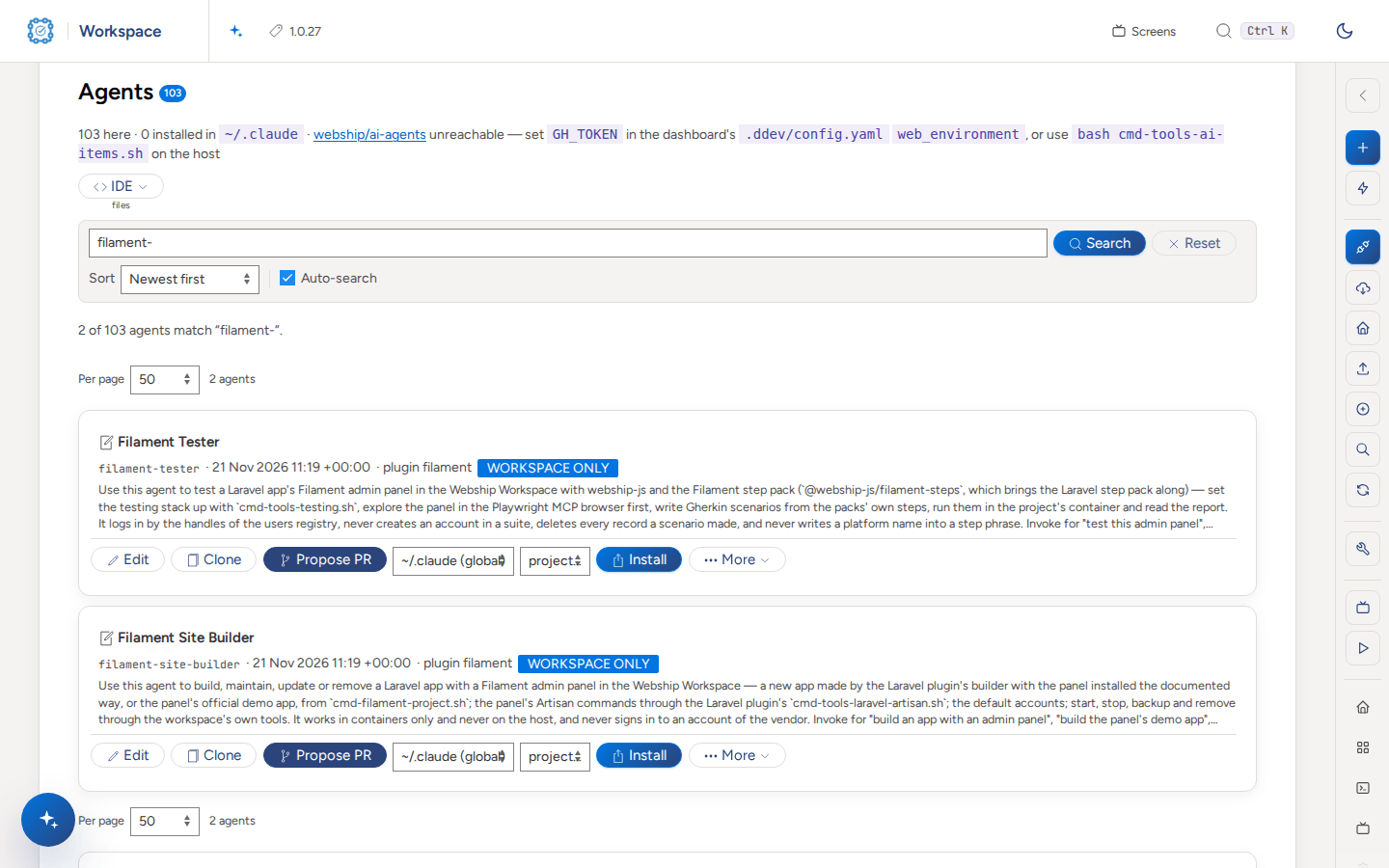
Build, update, maintain or remove an app with a panel with the builder and the Artisan tool, in containers only, with no account of the vendor and nothing paid |
| Agent | filament-tester |
Set the testing stack up, look at the panel in the Playwright MCP browser first, write scenarios from the packs' steps and run them; it never creates an account in a suite, deletes what a scenario made, and never writes a platform name into a step phrase |
| Skill | filament-scenarios |
Write a scenario from phrases that exist: the packs' steps by area, the handles of the users registry, the traps found on a real panel, and three features that pass on the demo app |
| Command | /filament-test <app> [feature or @tag] |
Run the suite of an app from inside a session: set up when missing, match every step, run, report what failed and why |
| Prompt | filament-build-and-test |
Start a session that builds an app with a panel, says what it is, sets the testing stack up and runs the first feature |
| Prompt | filament-scenarios-for-a-resource |
Start a session that writes and runs the scenarios of one resource of the panel: its list, its form, its actions |
After --install each is in its folder on the dashboard. Install there puts an agent, a skill or a command into Claude Code (~/.claude/agents, ~/.claude/skills, ~/.claude/commands), or from the command line:
cd ~/workspace/ai-agents   && bash cmd-tools-ai-items.sh filament-tester --install
cd ~/workspace/ai-skills   && bash cmd-tools-ai-items.sh filament-scenarios --install
cd ~/workspace/ai-commands && bash cmd-tools-ai-items.sh filament-test --install
A prompt is not installed: it is the whole claude … launch command of a new session, and the dashboard's New screen form lists it as a template. By hand, fill the placeholders in and run the command of the file from the folder it names.
The items are written for any AI CLI, with Claude Code as the default shape: the frontmatter and the file layout are Claude Code's, the body of each item is plain Markdown that names no tool or feature of one CLI, a command says in words what its arguments are, and the text between the triple quotes of a prompt can be given to another AI CLI as it is.
Every step phrase the items show is checked against the definitions of the panel's step pack, of the Laravel pack it brings and of webship-js (tests/fixtures/step-definitions.txt), and every command and flag against the plugin's own, the Laravel plugin's and the workspace's.
Develop it
npm install     # builds dist/ (TypeScript)
npm run lint
npm test        # the manifest, the builder, the AI items, the functions against a scaffolded project
CI runs the same on Node.js 20 and 24, parses every shell script, and runs the plugin's features/filament.feature against a dashboard with this plugin (and the Laravel plugin it needs) installed (webship/workspace/.github/workflows/plugin-browser-suite.yml).
When the step pack's release line changes, refresh the fixture from a project whose testing stack is set up: node <this plugin>/tests/fixtures/refresh-step-definitions.js > <this plugin>/tests/fixtures/step-definitions.txt.
In pictures
Build a Filament admin panel
Add the plugin: require, activate and install @webship.co/workspace-filament (see "Add a Webship Workspace plugin"). Its tab in Settings says it is turned on and what it needs.
bash core/scripts/plugins.sh --require filament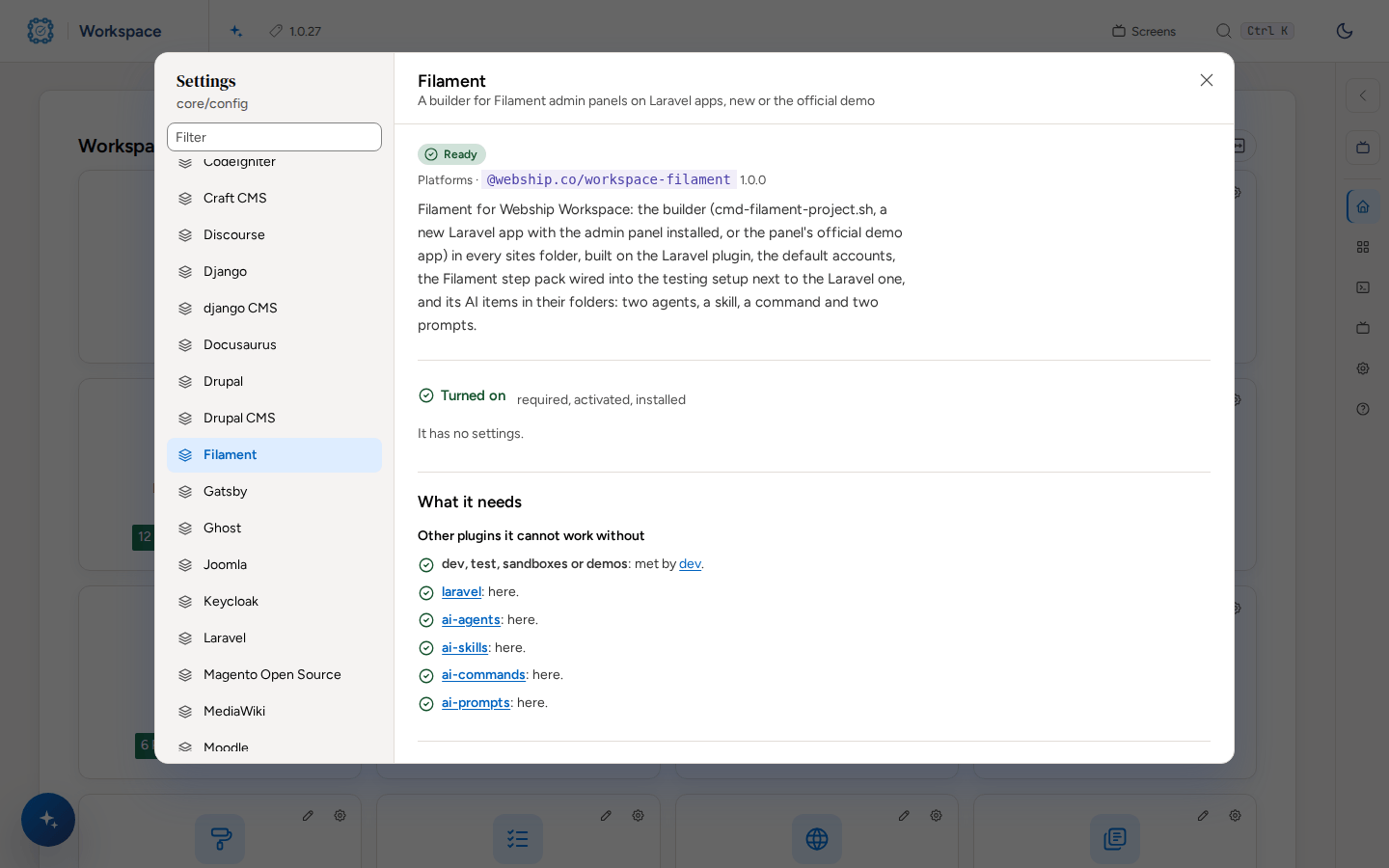
Open a sites folder such as Dev, pick "Filament (admin panel on Laravel)", type a name and open Arguments for its options.
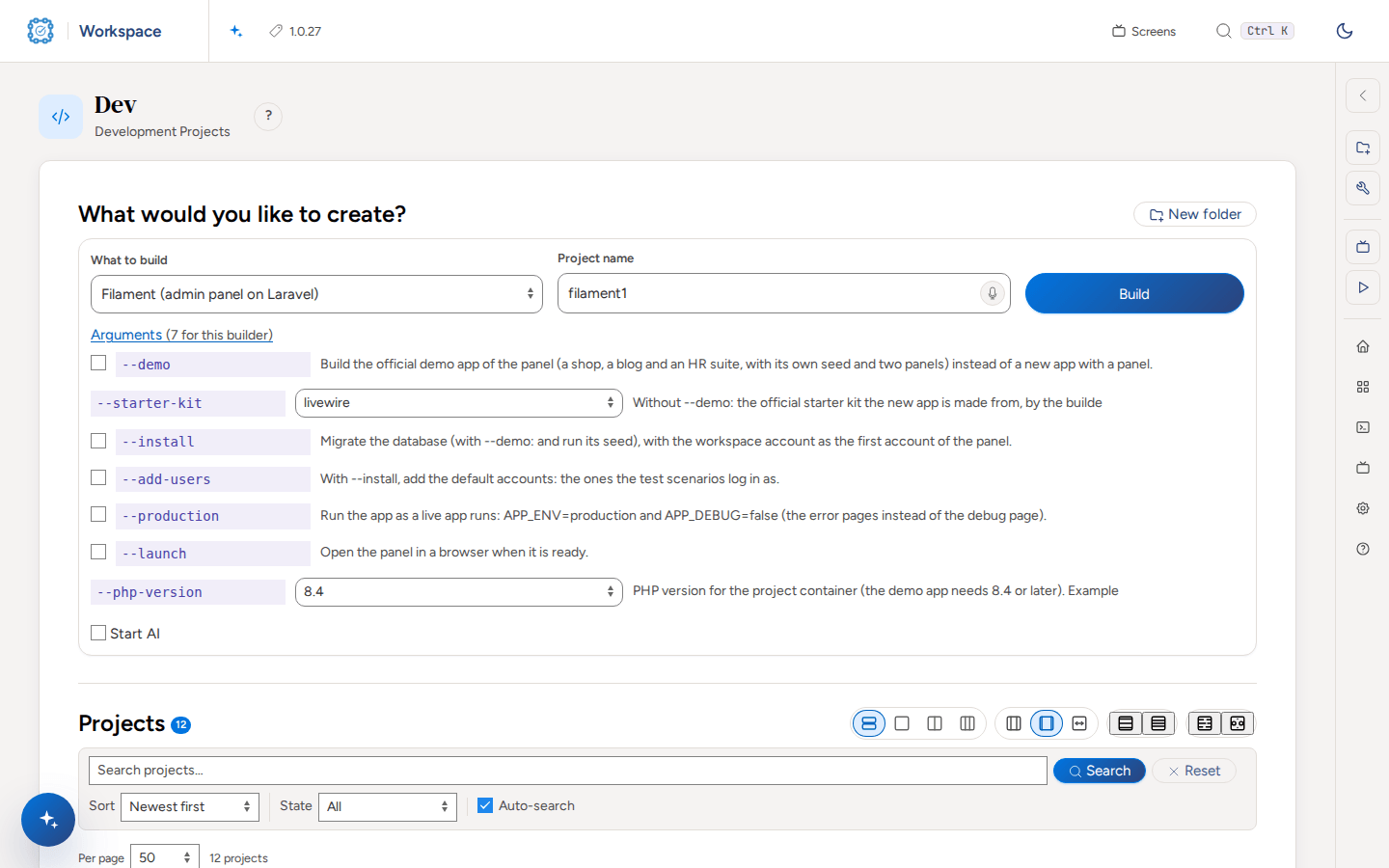
Press Build. The builder makes the admin panel in a container (DDEV by default) and runs in a screen session you can watch on Screens.
bash dev/cmd-filament-project.sh filament-demo --install --add-usersA Filament app is a Laravel app: the Laravel plugin, which it needs, brings cmd-tools-laravel-artisan.sh for it.
The plugin brings two AI agents, a site builder and a tester. They are on AI Agents, ready to install into your AI CLI.
Test it
Set up testing on the built admin panel: Tests → Set up the testing environment, or the command. The setup wires the Filament step pack (@webship-js/filament-steps) into cucumber.js with the accounts registry and writes a first feature, tests/features/site.feature.
bash cmd-tools-testing.sh filament-demo
Run the tests from Tests → Run the tests, or the command. The run is a screen session, and the row shows the result.
bash cmd-tools-testing.sh filament-demo --runThe tester agent writes and runs scenarios with the step pack. For tags, one feature, dry runs, failures and recordings, see "Test a project with Webship-js".